
MockGo 6.0.1
MockGo is a Windows and macOS GPS location changer for iPhone developed by Foneazy Studio. It supports iOS 9 through iOS 26 (including iPhone 17), offers teleport, joystick, multi-stop route simulation with GPX support, and works without jailbreak. Pricing starts at $9.95/month, with a lifetime license at $59.95. The free trial is very restrictive (one-time use of key features), and there's no Android support or phone-only workflow. It's a reliable, affordable option for iOS users, though the joystick mode lags and getting your real GPS back requires a reboot. Alternatives like iAnyGo add Android support and more waypoints for a higher price.
- Free trial
- Windows
- macOS
- Nov 10, 2026
Screenshots
About MockGo
MockGo Download, iPhone GPS Location Spoofer for PC and Mac
TL;DR Quick Take / Who is this for?
MockGo is a desktop application from Foneazy that changes the GPS location your iPhone reports to every app on it, without requiring a jailbreak, a developer certificate, or a sideloaded profile . It runs on Windows and macOS, connects to your iPhone via USB or Wi-Fi, and lets you pick a point on a map to teleport, simulate walking or driving routes, or control movement with an on-screen joystick . The tool is aimed squarely at Pokémon GO players, but it is also useful for developers testing geofenced features, privacy-conscious users who do not want every app knowing where they sleep, and anyone curious about what a dating app or marketplace looks like in another city . The free trial is functional but deliberately restrictive, capping teleport and joystick use at three attempts before prompting a purchase. The trade-offs are significant. The vendor site has no dedicated security page, and an independent analysis rated its security posture at just 1 out of 5 for that reason . Trustpilot feedback is polarised, with a 3.8–4.2 average but recent reviews warning of game account bans and a refund policy that one reviewer called a "complete scam" . MockGo is the right pick for iPhone owners who want a simple, desktop-based GPS spoofer at a lower price than some competitors and are prepared to accept the risks. It is not the best choice for Android users (it does not support Android at all), anyone who needs transparent security documentation, or players unwilling to risk their main game account .
Quick Info Box
| License Type | Shareware (limited free trial; paid plans from $9.95/month, lifetime $59.95) |
|---|---|
| File Size | Approx. 41 MB (desktop client) |
| OS Compatibility | Windows 11/10/8.1/8/7/Vista/XP; macOS 10.12 Sierra or later |
| Latest Version | 5.0.1 |
| Developer | Foneazy Technology Co., Limited |
Key Features & Real-World Usability
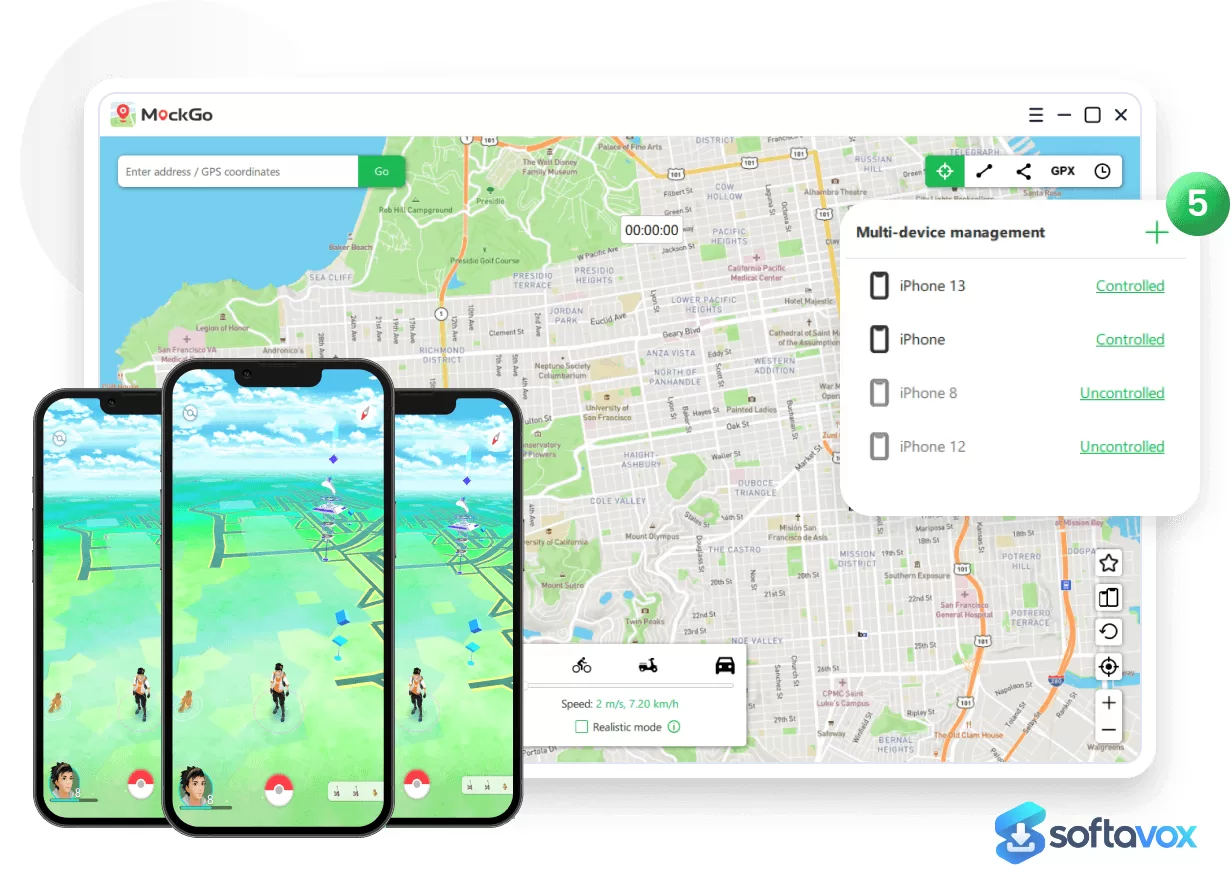
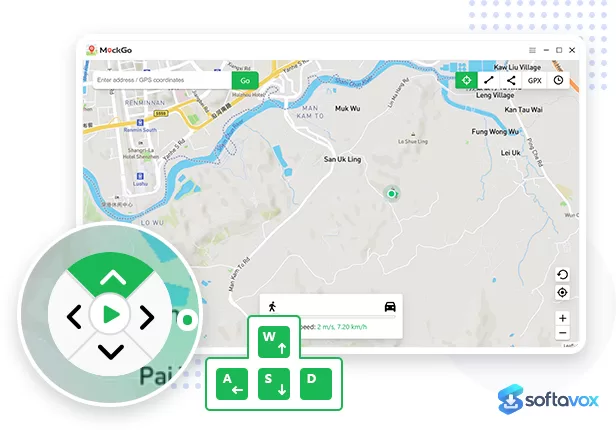
MockGo's workflow is built around a map-centric desktop interface that is easy to grasp even for non-technical users. You install the client, connect your iPhone with a cable (or over Wi-Fi on supported setups), and the software displays a large interactive map. From there, you choose a mode and a destination, and the phone's reported GPS coordinates change accordingly . The teleport mode is the core function: type an address or paste coordinates, click the pin, and the phone instantly believes it is in the new location. In independent testing, MockGo landed the new coordinates every time across multiple location-based apps, and the spoofed positions held steady rather than flickering back to the real location . The movement modes are where MockGo earns its keep for game players. Two-spot mode simulates travel between two points at a customizable speed, ranging from 3.6 km/h (a slow walk) to 108 km/h (highway driving) . Multi-spot mode routes the simulated position through a sequence of waypoints, and GPX import lets you reproduce a saved route with a single click . Joystick mode gives you real-time 360-degree control, which is useful for AR games that expect continuous movement rather than sudden jumps . A cooldown timer is built in for Pokémon GO, and the software can manage up to five iOS devices simultaneously on a standard licence . The device compatibility is generous: MockGo covers iOS 26 all the way back to iOS 9, which is deeper than most rivals bother with . A notable quirk is that MockGo requires iTunes to be installed on Windows even though you never open it, the drivers that ship with iTunes are what allow the client to communicate with the iPhone . The limitations are the ones reviewers consistently flag. The free trial is capped by uses rather than days, so you get three teleport and joystick attempts before the software locks . Movement simulation can lag or stutter mid-route rather than gliding smoothly, which matters if you are trying to look like a walking player rather than a teleporting one . And after an iOS upgrade, the phone can stop being detected until you re-establish the connection .
- Teleport mode: Instantly change the iPhone's GPS location to any point on the globe by clicking the map or entering coordinates, with consistent results in independent testing .
- Two-spot and multi-spot routes: Simulate travel between two points or through a sequence of waypoints at adjustable speeds from 3.6 to 108 km/h .
- Joystick control: Real-time 360-degree movement for AR games that expect continuous walking rather than instant jumps .
- GPX import and export: Reproduce saved routes with a single click and share them across sessions .
- Cooldown timer: Built-in Pokémon GO cooldown tracking to reduce the risk of triggering anti-cheat detection .
- Multi-device support: Manage up to five iOS devices at the same time on a standard licence, or fifteen on business plans .
- No jailbreak required: Works with standard, unmodified iPhones, keeping the device in a normal state for warranty and security purposes .
- Deep iOS compatibility: Supports iOS 9 through iOS 26, covering older devices that many competitors have abandoned .
Pros, Cons & Community/User Feedback
User sentiment around MockGo is genuinely mixed, and the split maps closely to what each user values. On Trustpilot, Foneazy holds a rating between 3.8 and 4.2 out of 5 across its regional pages, and several reviewers describe positive long-term experiences. One user who has used MockGo for over a year calls it "simple and straight forward to use," praising the teleport and multi-stop modes and noting that customer service has been "prompt and helpful" on a couple of occasions . Another reviewer with MockGo on two computers says it "works great" for Pokémon GO, that the wireless option is "amazing," and that they have "never gotten a warning" . A reviewer who used the trial and then purchased says the software "worked great" until an iOS upgrade caused a connection issue, but that Foneazy's tech support "was very responsive and eventually resolved my complex issue after two sessions" . These positive experiences are real, particularly for users who need a straightforward desktop spoofer and value the deep iOS version support. The negative feedback is equally specific and more recent. On the same Trustpilot pages, one reviewer writes: "It's a complete scam, and don't trust the 30-day refund policy because it's not going to work. Even PayPal is collaborating with them. I asked for a refund, and they sided with the company" . Another reviewer warns bluntly: "Don't download and pay for this product and play Pokemon Go. You will get banned. Currently location 12 error that Niantic is cracking down on location manipulation apps" . A separate complaint that appears in multiple reviews is the uninstall and licensing behaviour: "MockGo uninstall feature only works on the same PC. I installed the software on my PC, then unregistered and uninstalled the app on my PC, and tried to install and register MockGo on my Laptop. That does not work, unless you reach out to support" . Some users also report that the software works as advertised but has quirks: one reviewer gave four stars because "sometimes I cannot close the application, must kill task for stop it," and another notes that after formatting a PC, they had to contact support to reset the licence key . The security posture is a separate concern. An independent analysis rates MockGo's security at 1 out of 5 because the vendor site has no dedicated security page, meaning there is no published data-handling, payment, or privacy information to review before buying . The practical takeaway is that MockGo's core spoofing engine works well for many users, particularly on older iOS versions and with careful route simulation, but the refund policy, licensing restrictions, and game-ban risk are the areas where frustration and caution are highest .
Pros
- No jailbreak required; works with standard, unmodified iPhones
- Deep iOS compatibility from iOS 9 through iOS 26
- Teleport, joystick, two-spot, and multi-spot movement modes cover most spoofing scenarios
- GPX import and export for repeatable routes
- Multi-device support (up to five iPhones on a standard licence)
- Lower lifetime price than some competitors at $59.95
- Several users report prompt and helpful customer support
Cons
- No Android support whatsoever; iOS-only tool
- No dedicated security page on the vendor site; security posture rated 1/5 by independent analysis
- Trustpilot reviews include accusations of a scam-like refund policy and warnings about Pokémon GO bans
- Uninstall and licence transfer are restricted to the same PC unless you contact support
- Free trial is capped by uses (three teleport and joystick attempts), not days
- Movement simulation can lag or stutter mid-route
- Connection can drop after an iOS upgrade until re-established
- Requires iTunes to be installed on Windows even though it is never opened
Final Verdict & Safe Download Advice
MockGo is a capable and accessible GPS spoofer for iPhone owners who want a desktop-based tool without the complexity of jailbreaking. The teleport and route simulation features work reliably in independent testing, the iOS version support is unusually broad, and the lifetime licence at $59.95 is cheaper than some of the better-known alternatives . If you are a Pokémon GO player who wants to participate in distant raids, a developer testing geofenced features, or a privacy-conscious user who wants to obscure your location from tracking apps, MockGo will do the job, and the interface is approachable enough that you will not need a tutorial to get started. The caveats are serious enough to change the decision for many users. The lack of a security page is a transparency problem, the refund policy has drawn credible accusations, and the risk of game account bans is real. MockGo is not the right choice for Android users, for anyone who needs audited security documentation, or for players unwilling to risk their main Pokémon GO account. If you are on the fence, download the trial, test it with a secondary account, and read the refund terms carefully before paying. For iPhone owners who accept the risks, MockGo is a functional and reasonably priced option in a crowded category .
- Download only from foneazy.com: The official site is the only legitimate source for the installer and the trial. Third-party download portals may repackage the installer with unwanted software, and the vendor's own site is where the licence and trial are managed .
- Verify the installer size and version: The desktop client is approximately 41 MB, and the current version is 5.0.1. A dramatically smaller file or an installer claiming a newer version from an unofficial source is a warning sign.
- Check system requirements and device compatibility: MockGo requires Windows 11/10/8.1/8/7/Vista/XP or macOS 10.12 Sierra or later, and it controls iOS 9 through iOS 26 devices. It does not support Android, and it requires iTunes to be installed on Windows for the drivers .
- Understand the game ban risk before using it with Pokémon GO: Spoofing locations violates Niantic's terms of service, and Trustpilot reviewers confirm that bans do occur, citing the "location 12 error" that Niantic uses to detect manipulation . Use a secondary account if you are not prepared to lose your main one.
- Review the refund and licensing terms carefully: The 30-day refund policy has been criticised by users who say it is difficult to enforce, and the uninstall/licence transfer is restricted to the same PC unless you contact support. Read the terms before purchasing, and keep your receipt .
- Do not download "cracked" or "pre-activated" versions: MockGo is a paid product with a trial available. Cracked installers of location spoofing tools are a malware vector, and modified builds may request sensitive device permissions that the official software does not need.
Similar software
Key features
- iPhone GPS location spoofer, desktop app for Windows and macOS
- No jailbreak required, works with standard, unmodified iPhones
- Teleport mode, instantly change GPS location to any point on the map
- Two-spot and multi-spot routes, simulate walking/driving between points at adjustable speeds (3.6–108 km/h)
- Joystick mode, real-time 360-degree control for continuous movement
- GPX import/export, save and reuse custom routes
- Built-in Pokémon GO cooldown timer, helps reduce anti-cheat risk
- Multi-device support, manage up to 5 iPhones on a standard licence
- Deep iOS compatibility, supports iOS 9 through iOS 26
- USB or Wi-Fi connection, flexible setup options
Frequently asked questions about MockGo
Is MockGo safe to use?
Is MockGo free?
What is MockGo used for?
Does MockGo work on Android?
How do I get my real GPS location back after using MockGo?
Which iOS versions and iPhones does MockGo support?
Versions
| Version | Release date | Platform | File size | |
|---|---|---|---|---|
| MockGo 6.0.1 Latest version | Aug 11, 2026 | Windows | 220.0 MB | Download |
Comments about MockGo
No comments yet. Share your experience with this program!